
Q789 Withdrawal Guide for All Pakistani Users | Easy Steps
- Q789 Withdrawal allows users to request funds from their available gaming balance through the payment options shown in their account.
- Before submitting a withdrawal, check whether your account has any remaining wagering requirements. Complete them first if they appear.
- Users can select JazzCash, Easypaisa, a supported Pakistani bank, or a cryptocurrency exchange account for receiving payments.
Q789 Withdrawal Limits and Payment Time
- Minimum Withdrawal: Rs. 200 per request. Choose this amount or more when entering your withdrawal.
- Maximum Withdrawal: Rs. 50,000 in one transaction. A single request cannot exceed this limit.
- Multiple Withdrawals: After one transaction, users can request another withdrawal of up to Rs. 50,000, provided they have enough available balance.
- Payment Time: Withdrawals are stated to arrive within five minutes of submitting a request.
- Customer Support: If payment does not arrive, contact customer care and ask them to check the withdrawal status.
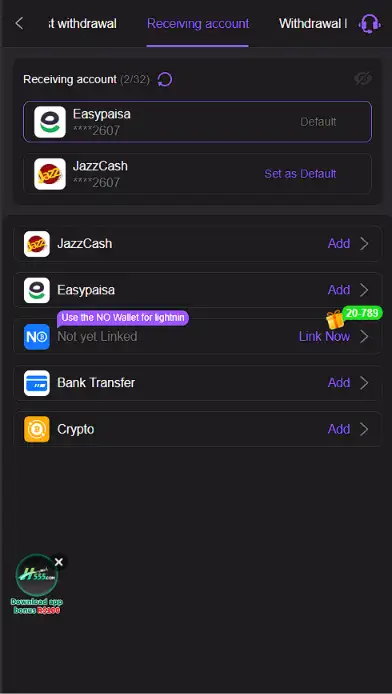
Q789 Withdrawal Methods in Pakistan
- JazzCash: Select JazzCash and add your mobile wallet number. Confirm the account details before requesting your money.
- Easypaisa: Choose Easypaisa, enter the wallet details requested by the game, and select this account when withdrawing.
- Bank Transfer: Add a supported Pakistani bank account. Banks in Pakistan include HBL, UBL, Meezan Bank, MCB, and Bank Alfalah. Select a bank available in the withdrawal menu.
- Cryptocurrency Exchange: Choose the available cryptocurrency option and add the receiving details requested for your exchange account. Verify the wallet address and network before confirming.
How to Withdraw Money from Q789 Game Login
Follow these simple steps to complete your withdrawal request.
- Open the Game: Launch Q789 Game and sign in to your registered account.
- Tap Withdrawal: Find the Withdrawal button at the top of the screen and open it.
- Set Your Password: Create a five-digit withdrawal password if you have not already set one.
- Choose a Method: Select JazzCash, Easypaisa, bank transfer, or cryptocurrency exchange.
- Add Your Account: Enter the requested wallet, bank, or exchange receiving details.
- Save the Details: Confirm that your chosen account is correct and save it.
- Check Wagering: Complete any outstanding wagering requirement shown in your account. If none appears, continue.
- Enter the Amount: Choose an available amount between Rs. 200 and Rs. 50,000.
- Review Your Request: Check the amount and receiving account one more time.
- Enter Your Password: Type the five-digit withdrawal password you created earlier.
- Send the Request: Tap Withdraw or Confirm to submit the payment request.
- Receive the Payment: Check your selected receiving account within five minutes.
How to Check Your Withdrawal Status
- Open the Withdrawal area again after submitting your request.
- Check the transaction history or request status if that option is available.
- Confirm the amount, selected payment method, and receiving details match your request.
- Check the JazzCash or Easypaisa wallet, bank account, or exchange balance you selected.
- Keep the transaction reference or request details so customer care can locate the payment when needed.
What to Do if Your Q789 Withdrawal Is Delayed
- Check the Payment Time: Confirm how long it has been since you sent the withdrawal request.
- Review the Details: Check the requested amount and the receiving account you selected.
- Check Wagering Conditions: Confirm that any required wagering was completed before requesting the payout.
- Contact Customer Care: If your money has not arrived within five minutes, ask support to review the transaction.
- Share the Required Information: Provide the withdrawal amount, time, selected method, and transaction reference if available.
- Follow Support Instructions: Check your payment account again after customer care updates the request.
- Protect Your Password: Keep your five-digit withdrawal password private while seeking help with the payment.